Interpreter – It provides to evaluate the language grammar and description. This idea bases on having the class for each symbol in a specialized computer language.
From Design Pattern – Behavioral Patterns
Structure

Applicability
- It involves implementing an expression interface that interprets a particular context, such as SQL parsing, symbol processing engine, etc.
- It performs upon a hierarchy of expressions which every here is a terminal or no terminal.
- The interpreter pattern tree structure is somewhat similar to defined by the composite pattern with terminal expressions leaf object and non-terminal expression being composites.
- The tree contains the expressions to be evaluated and is usually generated by a parser, which is not part of the design pattern – interpreter.
- Map a domain to a language, the language to a grammar, and the grammar to a hierarchical, object-oriented design.
Note: It is often used on the specialized database query language such as SQL, the technical computer language often used to describe communication protocols. The most general-purpose computer language incorporates several specialized languages.
Pros and Cons
PROS
- Better scalability and flexibility.
- Add new ways to interpret the expression.
- Easy to implement simple grammar.
CONS
- Complex grammars are hard to maintain when your project scale is a vast project or the transactional systems.
- The interpreter pattern defines at last one class object for every rule in the grammar. Hence grammar containing many regulations can be hard to manage and maintain.
How to Implement
#1 Basic Sample
static void Main(string[] args)
{
	List<AbstractExpression> objExpression = new List<AbstractExpression>();
	Context context = new Context(DateTime.Now);
	Console.WriteLine("Please select the Expression  : MM DD YYYY or YYYY MM DD or DD MM YYYY ");

	context.expression = Console.ReadLine();
	string[] strArray = context.expression.Split(' ');

	foreach (var item in strArray)
	{
		if (item == "DD")
			objExpression.Add(new DayExpression());
		else if (item == "MM")
			objExpression.Add(new MonthExpression());
		else if (item == "YYYY")
			objExpression.Add(new YearExpression());
    	}

	objExpression.Add(new SeparatorExpression());

	foreach (var obj in objExpression)
	{
		obj.Evaluate(context);
    	}

	Console.WriteLine(context.expression);

	Console.ReadKey();
}

public class Context
{
	public string expression { get; set; }
	public DateTime date { get; set; }
	public Context(DateTime date) => this.date = date;
}

public interface AbstractExpression
{
	void Evaluate(Context context);
}

public class DayExpression : AbstractExpression
{
	private string expression;

	public void Evaluate(Context context)
	{
		expression = context.expression;
		context.expression = expression.Replace("DD", context.date.Day.ToString());
    	}
}

public class MonthExpression : AbstractExpression
{
	private string expression;

	public void Evaluate(Context context)
	{
		expression = context.expression;
		context.expression = expression.Replace("MM", context.date.Month.ToString());
	}
}

public class YearExpression : AbstractExpression
{
	private string expression;

	public void Evaluate(Context context)
	{
		expression = context.expression;
		context.expression = expression.Replace("YYYY", context.date.Year.ToString());
    	}
}

public class SeparatorExpression : AbstractExpression
{
	private string expression;
	public void Evaluate(Context context)
	{
		expression = context.expression;
		context.expression = expression.Replace(" ", "-");
	}
}
#2 Web Application Project
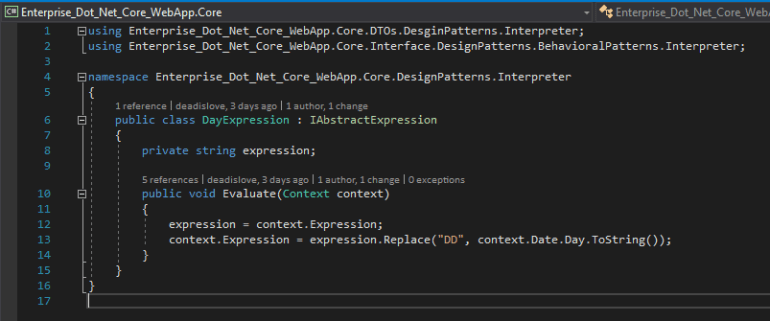
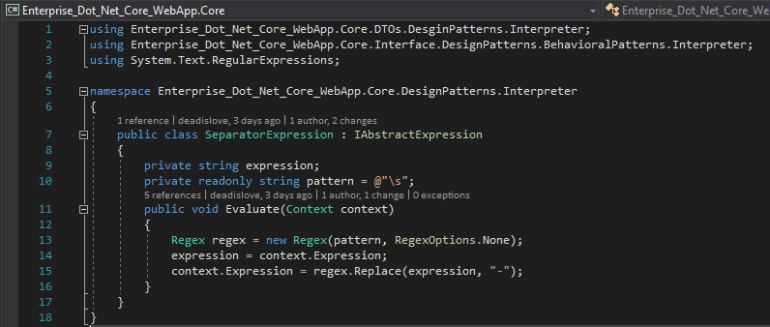
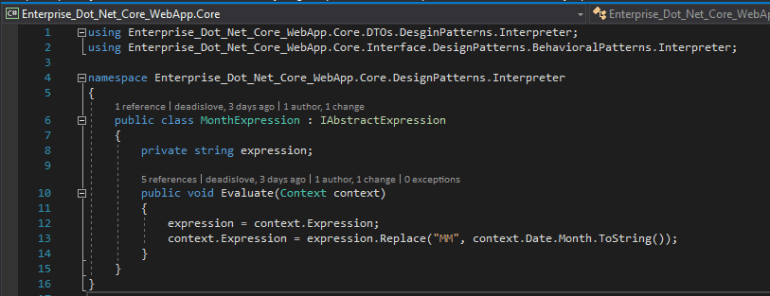
Step 1 Create the interpreter pattern interface class files and the interpreter pattern-related interface class files in the Core project. One interface class file name sets “IInterpreter.” Other interface class file name sets “IAbstractExpression.”

Step 2 Edit the interface class file from “IAbstractExpression” to start. Create the class files which need to inherit the “IAbstractExpression” interface class file.


Continued on next page…

1 Comment