Memento – It allows the programs to save and restore the object’s previous state without revealing its implementation details.
From Design Pattern – Behavioral Patterns
Structure

Applicability
- Use its pattern when the programs want to produce snapshots of the object’s state to restore a previous state of the object.
- Use its pattern when direct access to the object’s fields/getters/setters violates its encapsulation.
Pros and Cons
PROS
- The programs can produce the object’s state snapshots without violating its encapsulation.
- The programs can simplify the originator’s code by letting the caretaker maintain the originator’s state history.
CONS
- The web app might consume lots of RAM if the clients create mementos too often.
- The caretakers should track the originator’s lifecycle to be able to destroy obsolete mementos.
- Most dynamic programming languages can not guarantee which state within the memento stays untouched.
How to Implement
#1 Basic Sample
static void Main(string[] args)
{
	var before = (dynamic)null;
	var after = (dynamic)null;

	before = Process.GetCurrentProcess().WorkingSet64;
	Originator originator = new Originator("Super-duper-super-puper-super.");
	Caretaker caretaker = new Caretaker(originator);
	after = Process.GetCurrentProcess().WorkingSet64;
	Console.WriteLine($"Phyiscal RAM: {(after - before) / 1024} kB");

	before = Process.GetCurrentProcess().WorkingSet64;
	caretaker.Backup();
	originator.DoSomething();
	after = Process.GetCurrentProcess().WorkingSet64;
	Console.WriteLine($"Phyiscal RAM: {(after - before) / 1024} kB");

	before = Process.GetCurrentProcess().WorkingSet64;
	caretaker.Backup();
	originator.DoSomething();
	after = Process.GetCurrentProcess().WorkingSet64;
	Console.WriteLine($"Phyiscal RAM: {(after - before) / 1024} kB");

	before = Process.GetCurrentProcess().WorkingSet64;
	caretaker.Backup();
	originator.DoSomething();
	after = Process.GetCurrentProcess().WorkingSet64;
	Console.WriteLine($"Phyiscal RAM: {(after - before) / 1024} kB");

	Console.WriteLine();
	caretaker.ShowHistory();

	Console.WriteLine("\n(Now)State layout ");
	originator.Layout();

	before = Process.GetCurrentProcess().WorkingSet64;
	Console.WriteLine("\nClient: Now, let's rollback!\n");
	caretaker.Undo();
	after = Process.GetCurrentProcess().WorkingSet64;
	Console.WriteLine($"\nPhyiscal RAM: {(after - before)/1024} kB");

	before = Process.GetCurrentProcess().WorkingSet64;
	Console.WriteLine("\n\nClient: Once more!\n");
	caretaker.Undo();
	after = Process.GetCurrentProcess().WorkingSet64;
	Console.WriteLine($"\nPhyiscal RAM: {(after - before) / 1024} kB");

	before = Process.GetCurrentProcess().WorkingSet64;
	Console.WriteLine("\n\nRollback to origin value: ");
	caretaker.Undo();
	after = Process.GetCurrentProcess().WorkingSet64;
	Console.WriteLine($"\nPhyiscal RAM: {(after - before) / 1024} kB");

	Console.WriteLine("\n\n");
	originator.Save();

	Console.WriteLine("After save, Now: ");
	originator.Layout();

	Console.WriteLine("-----");

	Console.ReadKey();
}


public interface IMemento
{
	string GetName();
	string GetState();
	DateTime GetDate();
}

public class ConcreteMemnto : IMemento
{
	private string _state;

	private DateTime _date;

	public ConcreteMemnto(string state)
	{
		_state = state;
		_date = DateTime.Now;
	}

	public DateTime GetDate()
	{
		return _date;
	}

	public string GetName()
	{
		return $"{_date} / ({_state.Substring(0, 9)})...";
	}

	public string GetState()
	{
		return _state;
	}
}

class Caretaker
{
	private List<IMemento> _mementos = new List<IMemento>();

	private Originator _originator = null;

	public Caretaker(Originator originator)
	{
		_originator = originator;
	}

	public void Backup()
	{
		Console.WriteLine("\nCaretaker: Saving Originator's state...");
		_mementos.Add(_originator.Save());
	}

	public void Undo()
	{
		if (_mementos.Count == 0)
		{
			return;
		}

		var memento = _mementos.Last();
		_mementos.Remove(memento);

		Console.WriteLine("Caretaker: Restoring state to: " + memento.GetName());

		try
		{
			_originator.Restore(memento);
		}
		catch (Exception)
		{
			Undo();
		}
	}

	public void ShowHistory()
	{
		Console.WriteLine("Caretaker: Here's the list of mementos:");

		foreach (var memento in _mementos)
		{
			Console.WriteLine(memento.GetName());
		}
	}
}

class Originator
{
	private string _state;

	public Originator(string state)
	{
		_state = state;
		Console.WriteLine("Originator: My initial state is: " + state);
	}

	public void DoSomething()
	{
		Console.WriteLine("Originator: I'm doing something important.");
		_state = GenerateRandomString(30);
		Console.WriteLine($"Originator: and my state has changed to: {_state}");
	}

	private string GenerateRandomString(int length = 10)
	{
		string allowedSymbols = "abcdefghijklmnopqrstuvwxyzABCDEFGHIJKLMNOPQRSTUVWXYZ";
		string result = string.Empty;

		while (length > 0)
		{
			result += allowedSymbols[new Random().Next(0, allowedSymbols.Length)];

			Thread.Sleep(12);

			length--;
		}

		return result;
	}

	public IMemento Save() => new ConcreteMemnto(_state);

        public void Layout() => Console.WriteLine($"Layout: {_state}");

	public void Restore(IMemento memento)
	{
		if (!(memento is ConcreteMemnto))
		{
			throw new Exception("Unknown memento class " + memento.ToString());
		}

		_state = memento.GetState();
		Console.Write($"Originator: My state has changed to: {_state}");
	}
}
#2 Web Application Project
Step 1 Create two interface class files in the Core projects. One interface is about the services files, which name sets ‘IMementoServices.’ Another interface class is about the memento pattern, and name sets ‘IMemento.’


Step 2 Create three class files in the Core project’s design pattern folder. One class file name sets ‘ConcreteMemento,’ which inherits the Memento interface class. Another class file name sets ‘Originator,’ which doesn’t inherit any of the customer interface classes, then adds the customer record log mechanism for the originator doing something operation process layout. Other class file name sets ‘Caretaker’, which also doesn’t inherit any customer interface class, then add the operation function source code.

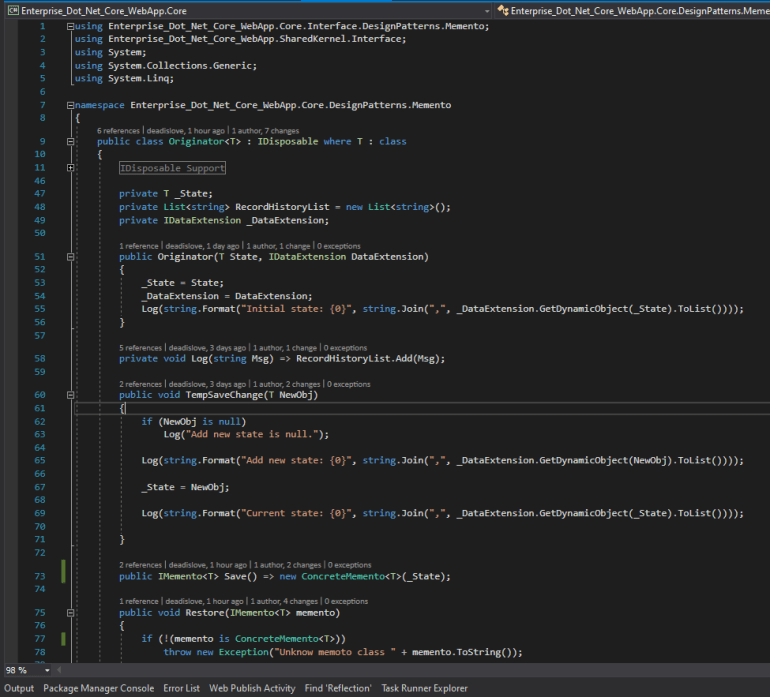

Step 3 Create the IMementoServices’s service class file, which inherits the IMementoService class file, and name sets ‘MementoServices.’ It only adds the BLL operation without any operation function.

Step 4 Create the memento pattern-related file in the Web projects, such as view part’s index page, the controller files.

Step 5 Register the IMementoService class file and the MementoService class file in the Web project’s startup.cs file.
// Memento
services.AddScoped(typeof(IMementoServices<>), typeof(MementoServices<>));
Reference

1 Comment