Private Class Data – Restricts accessor/mutator access. Control write access to object attributes and separate data from function to use it. Encapsulate class data initialization.
From Design Pattern – Structural Patterns
Structure

Applicability
This design pattern applies to any class in many object oriented languages, or any situation.
Pros and Cons
PROS
- Reduce exposure of attributes by limiting the program visibility.
- Reduce the number of class attributes by encapsulating them in single data objects.
- It allows the class designer to remove the write privilege of attributes intended to be set only during construction, even from the target class methods.
CONS
- Controlling write access to class attributes.
- It is separating data from the method that uses it.
- Encapsulating class attribute data initialization.
- Providing the final new type – final after a constructor.
How to Implement
#1 Basic Sample
public class CircleData
{
	public CircleData(double radius, Color color, Point origin)
	{
		this.Radius = radius;
		this.Color = color;
		this.Origin = origin;
	}

	public double Radius { get; }

	public Color Color { get; }

	public Point Origin { get; }
}

public class Circle {
	private CircleData circleData;

	public Circle(double radius, Color color, Point origin)
	{
		this.circleData = new CircleData(radius, color, origin);
	}

	public double Circumference {
		get { return this.circleData.Radius * Math.PI; }
	}

	public double Diameter {
		get { return this.circleData.Radius * 2;  }
	}

	public void Draw(Graphics graphics)
	{
		Image newImage = Image.FromFile("SampImage.jpg");
		PointF ulCorner = new PointF((float)this.circleData.Radius, (float)this.circleData.Radius);

		graphics.DrawImage(newImage,ulCorner);

	}
}
#2 Web Application Project
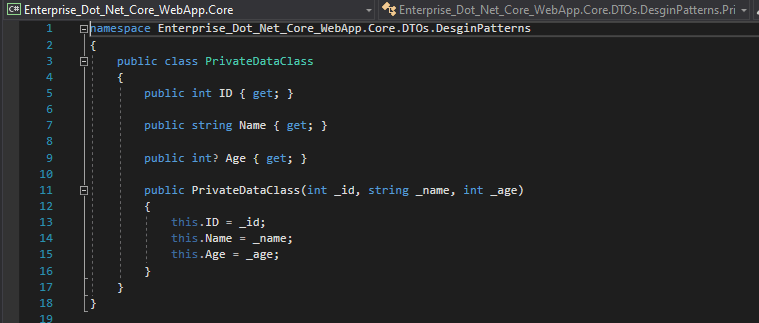
Step 1 Create the data transfer object(DTO) file for the private data class file that is in the Core project.
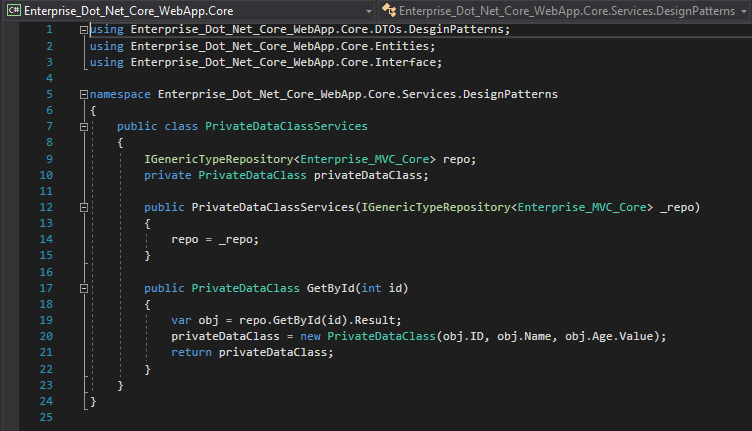
Step 2 Create the service class file then implement the generic type repository interface class.
Step 3 Create the Controller file and the Index page in the web project.
Step 4 Register the service class file of the private data class pattern.
// Private Data Class
services.AddScoped(typeof(PrivateDataClassServices));Reference

1 Comment