Building MVC pattern project by Visual Studio 2017 ( ASP.Net Core Part )

Last week, we talked about the building MVC pattern project, which uses the enterprise architecture based on the .Net framework. ( Building MVC pattern project by Visual Studio 2017 ( ASP.Net framework Part ) ) It was easy to understand the MVC web application how to run in the enterprise architecture. If we changed the frameworks, how to build the MVC pattern web application?
Now, we use the .NET Core framework for building MVC patterns. We keep using the basic view page concept that means we don’t fully use the razer page. The web application project follows the onion architecture, such as web application projects, core projects(class library projects), and the infra projects(class library projects), so we will have the three projects without the unit test project. All of the project frameworks will be to target the ASP.NET Core framework. You also can use other frameworks on the class library project, such as the .NET standard framework and the .NET framework. Remember the older version .NET standard framework has a few problems which solution has written on “Building MVC pattern project by Visual Studio 2017 ( ASP.Net framework Part ).”
ASP.NET Core framework v2.8 for the MVC pattern
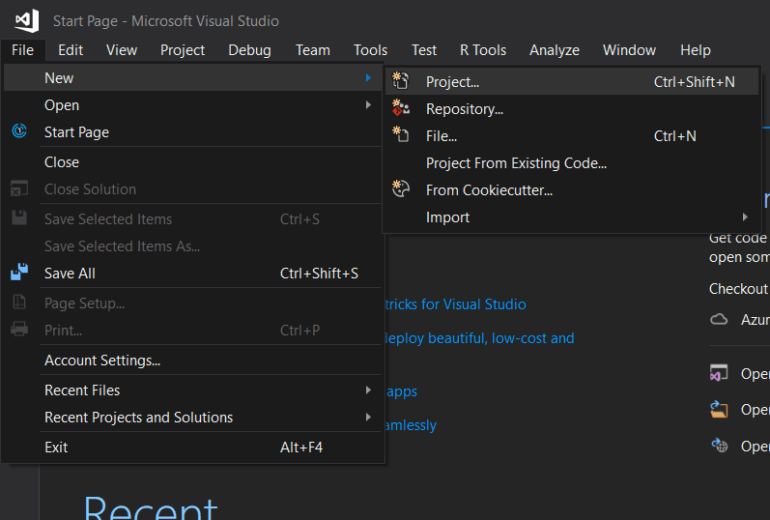
Step 1. Create a new solution with ASP.NET Core web application project. Click File -> New -> Project.
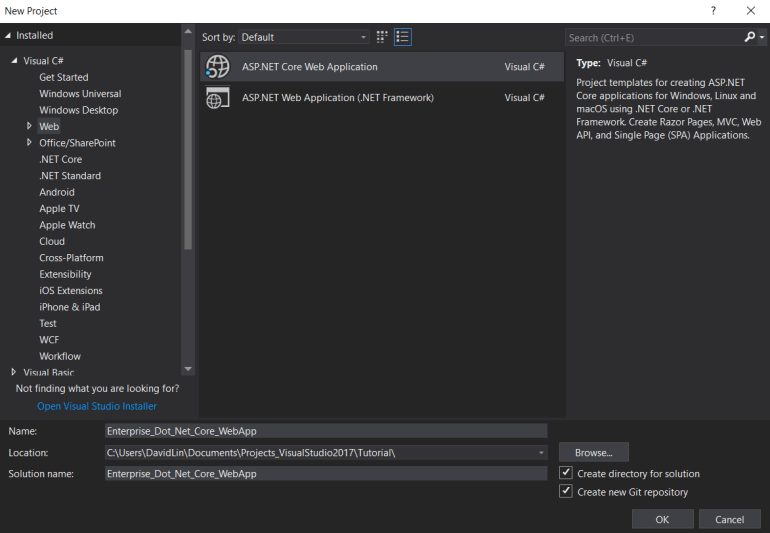
Select the “ASP.NET Core Web Application” item in the new project dialog box. The project name sets “Enterprise_Dot_Net_Core_WebApp.”
Step 2. Select “Web Application(Model-View-Controller).” This sample project’s view part won’t consider the razor page, Angular, React.js, etc. We consider the situation which can be used for RESTful HTTP services.
Remember, this project doesn’t use the Authentication mechanism and the HTTPS portal.

Note: This template is ASP.NET Core 2.2 template project because the Visual Studio compiler only supports ASP.NET Core 2.8. ASP.NET Core 3+ supports Visual Studio 2019 compiler. Suppose you want to use the new version template project. Please, install the new template project from the official Microsoft website.
You will see your project solution explorer that looks like Fig 4.

Step 3. The first time, running a web application project under the debug model.

1 Comment