Building MVC pattern project by Visual Studio 2017 ( ASP.Net Core Part )

Step 4. Create a new class library project called the Core project based on the ASP.NET Core framework. Right-click on solution item -> Add -> New project.

Step 5. Select “Class Library(.NET Core)”, then click “Add” button. The core project name sets “Enterprise_Dot_Net_Core_WebApp.Core.”

Step 6. Create the Interface folder under the core project. Change the default class file name from “class1.cs” to “Enterprise_MVC_Core.cs.”
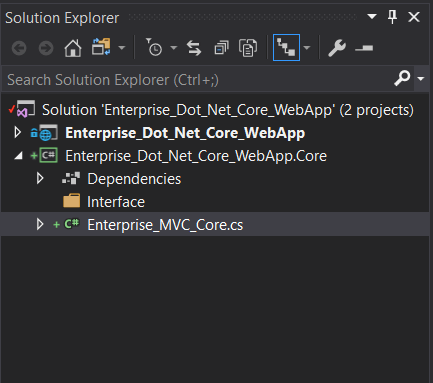
Edit the Enterprise_MVC_Core.cs file, then adding some codes in the Enterprise_MVC_Core.cs file.

 using System;
 using System.Collections.Generic;
 using System.ComponentModel.DataAnnotations;
 using System.ComponentModel.DataAnnotations.Schema;
 using System.Text;
 namespace Enterprise_Dot_Net_Core_WebApp.Core.Entities
 {
     [Table("Enterprise_MVC_Core")]
     public class Enterprise_MVC_Core
     {
         [Key]
         public int ID { get; set; }
     public string Name { get; set; }     public int? Age { get; set; }  }
 }
Step 7. Create the Entities folder, then move the Enterprise_MVC_Core file to the Entities folder. Create the new class file, whose name is “IEnterprise_MVC_CoreRepository.”

Step 8. Add interface source code in the IEnterprise_MVC_CoreRepository file.

 using System;
 using System.Collections.Generic;
 using System.Text;
 using Enterprise_Dot_Net_Core_WebApp.Core.Entities;
 namespace Enterprise_Dot_Net_Core_WebApp.Core.Interface
 {
     public interface IEnterprise_MVC_CoreRepository
     {
         void Add(Enterprise_MVC_Core o);
         void Edit(Enterprise_MVC_Core o);
         void Remove(int ID);
         IEnumerable GetData();
         Enterprise_MVC_Core FindById(int ID);
     }
 }
1 Comment