Building MVC pattern project by Visual Studio 2017 ( ASP.Net Core Part )

Step 14. We come back to the web project, then creating a new controller file about the access layer and the business logic layer. First, the web application project must add the core projects and the infra projects to the web application project’s reference part. Right-click on the controller folder -> Add -> Controller.
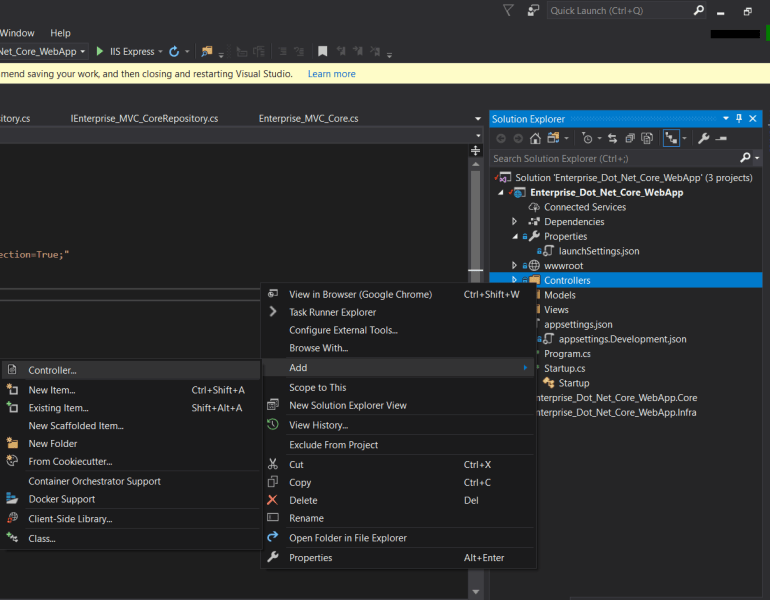
Second, I directly edited the CRUD source code in last week’s article (Building MVC pattern project by Visual Studio 2017 ( ASP.Net framework Part ).) We use Visual Studio 2017 to generate the source code about CRUD now that are other methods to edit code.
Select the “MVC Controller with views, using Entity Framework.”

- Model class field – Select the model class file from the Entities folder of the core project.
- Data context field – Select the DbContext file from the DBContext folder of the infra project.

After the Visual Studio completes execution over creating the controller file and other relational files, the web application project’s solution explorer will below like the picture. The Visual Studio will help the developer establishes the view file with source code under the Views folder.

Step 15. Remove _context code part or comment out _context code in the Enterprise_MVC_Core Controller file because we want to use the repository interface method with database interaction and follow the IoC (Inversion of Control).

Step 16. Open the appsetting JSON file, then adding the database connection string in this file.

Step 17. Open the startup file, then adding database connection source code and scope method.
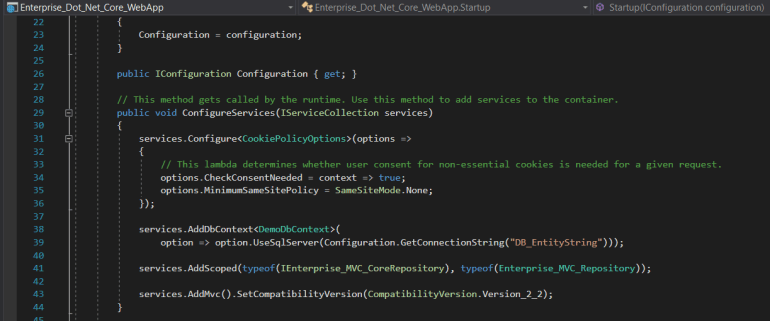
Note: This project’s database uses the MS SQL server, so this project has installed Microsoft.Entityframework.sqlserver NuGet package by package manager platform. If you want to use another database, you will need to install another NuGet package by NuGet package manager platform or NuGet console.
Conclusion
We have created an ASP.NET Core web application that is base on the Onion architecture. The infra project and the Core project will package the dll file under the bin folder. You will don’t worry about the database access layer and the business logic layer that is affect your web application project. If you want to add the business logic, you only add the Core project. If you’re going to add the data access parts, you only add the Infra project. It will follow the standard web application layer, such as the UI layer, business logic layer, and the data access layer.
Reference
- What is MVVM? MVP? MVC?
- Building MVC pattern project by Visual Studio 2017 ( ASP.Net framework Part )
1 Comment